Indicators for the AI era. Your agent reads the same signals you see.
You see a WiSE entry on your chart in a second. An AI agent needs exact prices, not a picture of the chart. It needs the entry as data. WiSE can write that data to a live file on your PC, and an agent that can read files on that PC can read it.
What you need
- WiSE 2.11.0 or later for the signal file. WiSE 2.13.0 or later for pending entries.
- Export signals to file turned on in the WiSE Properties dialog, group Signal export. It is off by default, and with it off WiSE writes nothing.
- An AI agent or a script that runs on the same PC and has permission to read files in your Documents folder.
How an entry gets to the agent
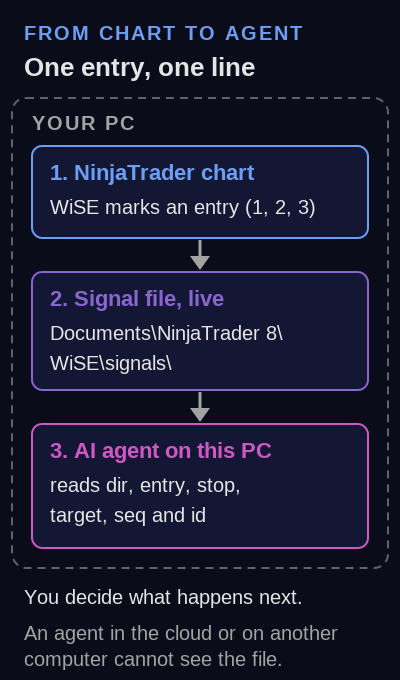
- WiSE marks an entry (1, 2, 3 ...) on a closed bar of your chart.
- WiSE writes one line for it to a file in
Documents\NinjaTrader 8\WiSE\signals\. One file per instrument, bar type and trading day. - Your agent reads the new line. It gets the exact entry price, stop and target, so it does not have to guess them from a screenshot of the chart.
Each line is one JSON object. An entry line has dir (long or short), entry, stop, target, the signal bar time, high and low, a row number seq and a stable id. With Export pending entries on, the file also lists the entry WiSE takes if the next bar breaks the last closed bar, with its trigger, entry price and stop, before that bar trades. Every field is on the Signal export page.
What an agent can and cannot do
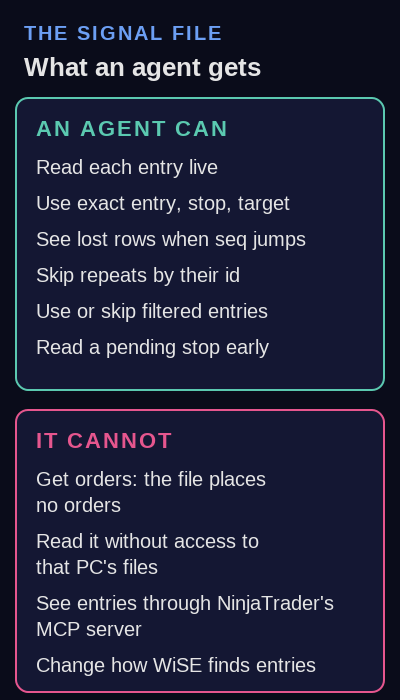
An agent can:
- Read each entry as WiSE writes it, with the exact entry, stop and target.
- Spot lost rows.
seqcounts 1, 2, 3 ... in each file, so a jump means rows are missing. - Skip an entry it already has. A chart reload gives the same
idto the same entry. - Decide about filtered entries. WiSE writes them too, with
"filtered": true. - Read a pending entry and its stop before the entry bar (WiSE 2.13.0 or later).
An agent cannot:
- Get an order from the file. WiSE writes a file and nothing more. If your agent places orders, it does that through other software, not through WiSE.
- Read the file from somewhere else. The file stays on your PC. An agent in the cloud or on another computer sees it only if you give it access to that PC's files.
- Change how WiSE finds entries. WiSE uses fixed rules, with no AI inside, so the same bars give the same entries and stops.
We do not ship a reader tool for agents yet. The agent reads the file itself, using the format on the Signal export page.
NinjaTrader's MCP server does not read this file
MCP (Model Context Protocol) is a common way for an AI agent to call outside tools. NinjaTrader has its own MCP server. It is a remote server: your agent connects to it over the internet, and its tools cover accounts, market data, orders and trade history. It does not read the WiSE signal file, because that file is on your PC and the server is not. An agent that uses NinjaTrader's MCP server sees no WiSE entries unless it also reads the file on your PC.
Before you let an agent act
An agent that acts on signals can also act wrongly, and fast. Run it on a SIM account or in Playback first, and read what it did. Results vary.
We are building a kit for AI trading agents on NinjaTrader 8. See the agent kit page.
Next: see what's new.

WiSE
Price action, trend lines and measured moves. $25/mo · 7-day free trial.