
Time ranges, the last hour delta and hourly stats on your chart.
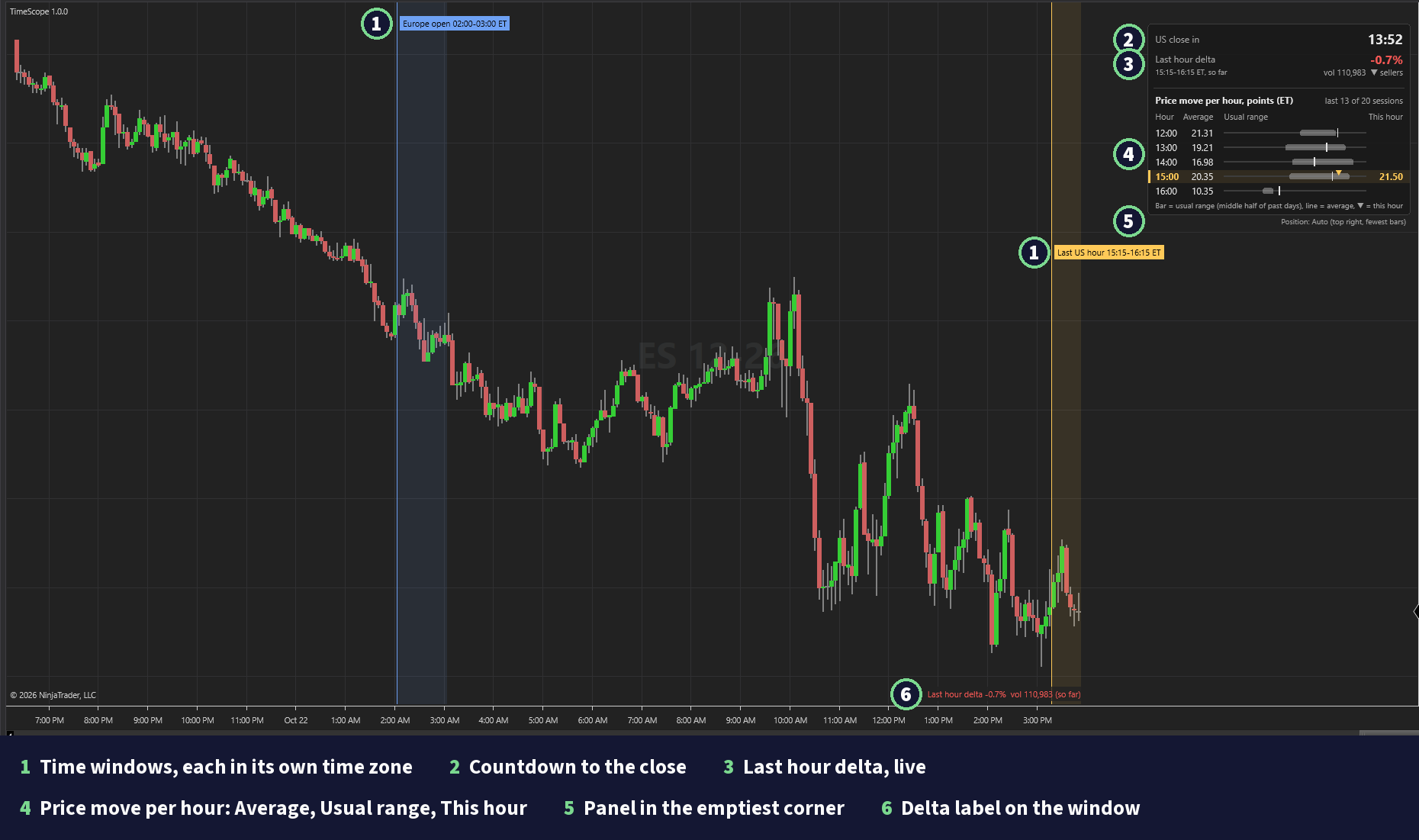
TimeScope is an indicator for NinjaTrader 8. It shades clock windows such as the Europe open, writes the buy and sell balance of the last US hour, shows how far each hour moved over the last 20 sessions, and counts down to the US close.
Free with a Wizdough account
Create a free account and confirm your email. Then download TimeScope from your dashboard. Your license is made for the email of your account, so type that email in NinjaTrader.
Four parts, each with its own switch.
Time ranges
It shades up to six clock windows, each with a label that gives its times in New York time (ET). Two are on by default: the Europe open (08:00 to 09:00 Central Europe) and the last US hour (15:15 to 16:15 New York). Each window keeps its own time zone. So in the weeks when Europe and the US change their clocks on different dates, the Europe open moves one hour in ET for those weeks.
Last hour delta
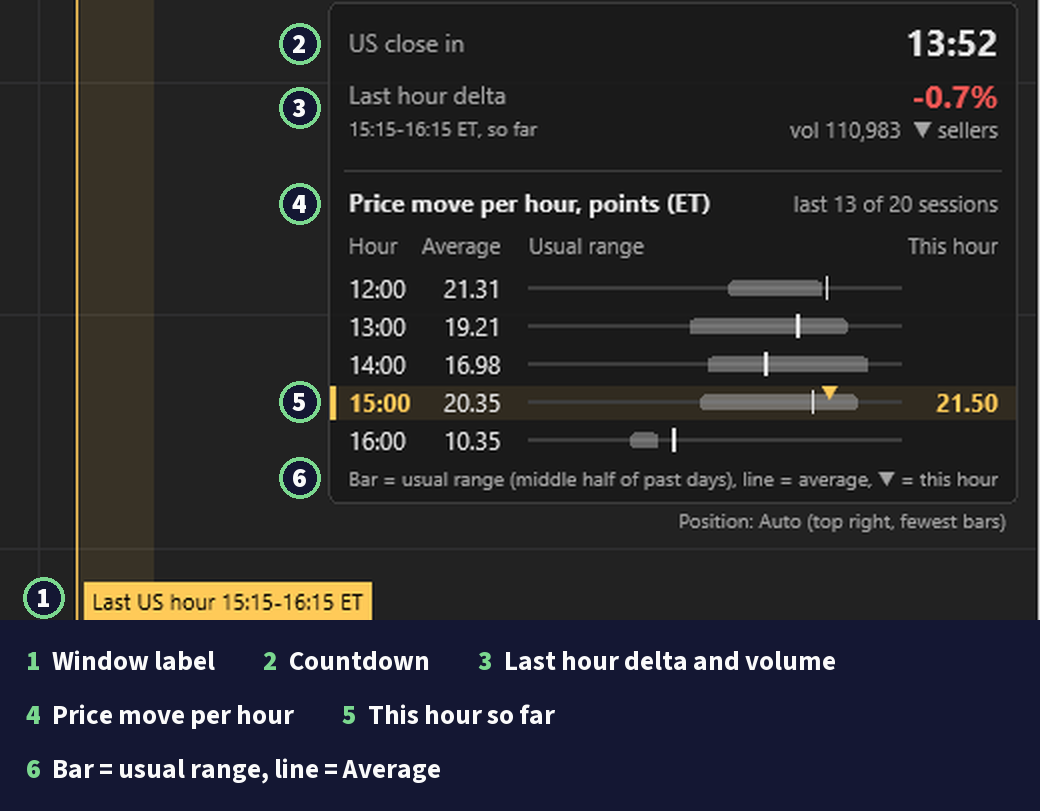
At 16:15 ET it writes the delta of the last US hour: buy volume minus sell volume, divided by all volume, from minus 100% to plus 100%. A trade at or above the ask counts as a buy, at or below the bid as a sell. The label says "partial" when ticks are missing and "so far" while the hour runs. It describes the market. It is not a signal.
Hourly stats
A table called Price move per hour gives one row per ET clock hour: the Average move of that hour over the last 20 sessions, its Usual range (the middle half of past days), and This hour so far. By default it shows the current hour, the 3 hours before it and the 1 after it. You can switch it to the net move, and to ticks. It shows the past. It is not a forecast.
Countdown
It shows the time left to the US close at 16:00 New York. In Playback it follows the Playback clock.
The countdown, the last hour delta and the hourly table sit together in one info panel. It goes to the chart corner with the fewest bars, and you can drag it anywhere.
The last hour delta needs Tick Replay with bid and ask history for past days. Without it only live ticks count, and the chart says how to turn it on. Windows outside the US day session need a 24 hour (ETH) Trading Hours template.
What it draws.
The main settings.
The names in the NinjaTrader settings dialog, with their defaults. The settings guide lists every row.
Time ranges
- Show time ranges
- default On
- Time range 1
- default Europe open, 08:00 to 09:00 Central Europe, on
- Time range 2
- default Last US hour, 15:15 to 16:15 New York, on
- Time range 3
- default US open, 09:30 to 10:30 New York, off
- Time range 4
- default London open, 08:00 to 09:00 London, off
- Time range 5
- default Tokyo open, 09:00 to 10:00 Tokyo, off
- Time range 6
- default US lunch, 12:00 to 13:00 New York, off
- Shade opacity (%)
- default 10
- Show labels
- default On
Last hour delta
- Show last hour delta
- default On
- Start (ET)
- default 15:15
- End (ET)
- default 16:15
- Days to keep
- default 20
- Show data warning
- default On
Hourly stats
- Show hourly stats
- default On
- Sessions
- default 20
- Measure
- default Range
- Units
- default Points
- First hour (ET)
- default 2
- Last hour (ET)
- default 16
- Skip short sessions
- default On
- Hour rows
- default Near now (3 before, 1 after)
Countdown
- Show countdown
- default On
- Name
- default US close
- Close time
- default 16:00
- Time zone
- default New York
Info panel
- Show info panel
- default On
- Position
- default Auto (emptiest corner)
- Panel opacity (%)
- default 92
Appearance
- Color theme
- default Wizdough
- Label font
- default Segoe UI 11
Guides
Runs on NinjaTrader 8
Trading futures and forex involves substantial risk of loss and is not suitable for all investors. Past performance is not indicative of future results. See our full risk disclosure.