What to look for in a second entry indicator
A second entry indicator counts the legs of a pullback and marks the bar where the second try starts. Before you pay for one on NinjaTrader 8, put it through the checks below. Under each one we say how WiSE handles it, and link the page in our docs that backs it up.
Nine things to check.
The rules are written down.
What to check
Every mark should follow a rule you can read. If the vendor cannot tell you what makes a bar a 2, you cannot tell a good signal from a bad one.
How WiSE does it
Our guide defines each mark: 0 for a new high or low, 1 for a first entry, 2 for a second entry, H and L for higher lows and lower highs. It also says where the 2 sits, and when it moves to an outside bar.
Failed entries stay on the chart.
What to check
A chart that hides its losers tells you nothing about how often the setup fails.
How WiSE does it
WiSE checks each second entry against your Profit target. One that turns back first is marked c, for challenged. If it then breaks the stop behind the signal bar, it gets an x, for failed.
It is honest about repainting.
What to check
Ask what happens to a mark after its bar closes, and what the tool shows while the bar is still forming. Get the answer in writing.
How WiSE does it
No repaint on closed bars. A 1 or 2 on a forming bar is drawn in the Unconfirmed color, and it can move or disappear when the bar closes. An alert it already fired stays fired, so turn on Alert on bar close if you want alerts to wait for the close. Our Known limits list covers the other live chart details.
You choose the alerts.
What to check
You will not watch every bar of the session. Make sure you can pick which signals alert you, and with which sound.
How WiSE does it
Pick up to 12 signals to plot. Each one can have its own alert and its own sound, say one for a second entry long and another for a second entry short.
You can see what the filters hid.
What to check
Filters cut noise. A filter that deletes signals also hides what it removed.
How WiSE does it
A filtered signal stays on the chart in the Hidden color and does not alert. Turn on Show filter names to see which filter hid it.
It works on the bars you trade.
What to check
Some tools assume minute bars. If you trade tick, volume or range bars, test the tool on them.
How WiSE does it
WiSE works on any bar type and timeframe. It is popular on an ES 2000 tick chart with an EMA period of 21. It needs NinjaTrader 8 to run.
A strategy can read it.
What to check
If you automate, or plan to, your strategy code has to be able to read the signals.
How WiSE does it
WiSE writes its signals to plots that a NinjaScript strategy can read, and it can write each entry to a file for a journal, a spreadsheet or a bot. Live, the plot values for a new high or low, a higher low, a lower high or an entry arrive one bar later than after a reload.
Docs and updates you can check.
What to check
A manual that explains every setting, and a change log that shows the tool is still looked after.
How WiSE does it
The settings reference covers every setting, and the change log lists each version. From 2.15.0 the Help group in the WiSE settings checks for a newer version.
A real trial and a published price.
What to check
Test the tool on your own charts before you pay, and know the price and renewal terms up front.
How WiSE does it
The first 7 days are free. Before you confirm checkout you see the charge and the date billing starts. After that it is $25 a month or $240 a year, and it renews until you cancel from your dashboard.
What it looks like in NinjaTrader.
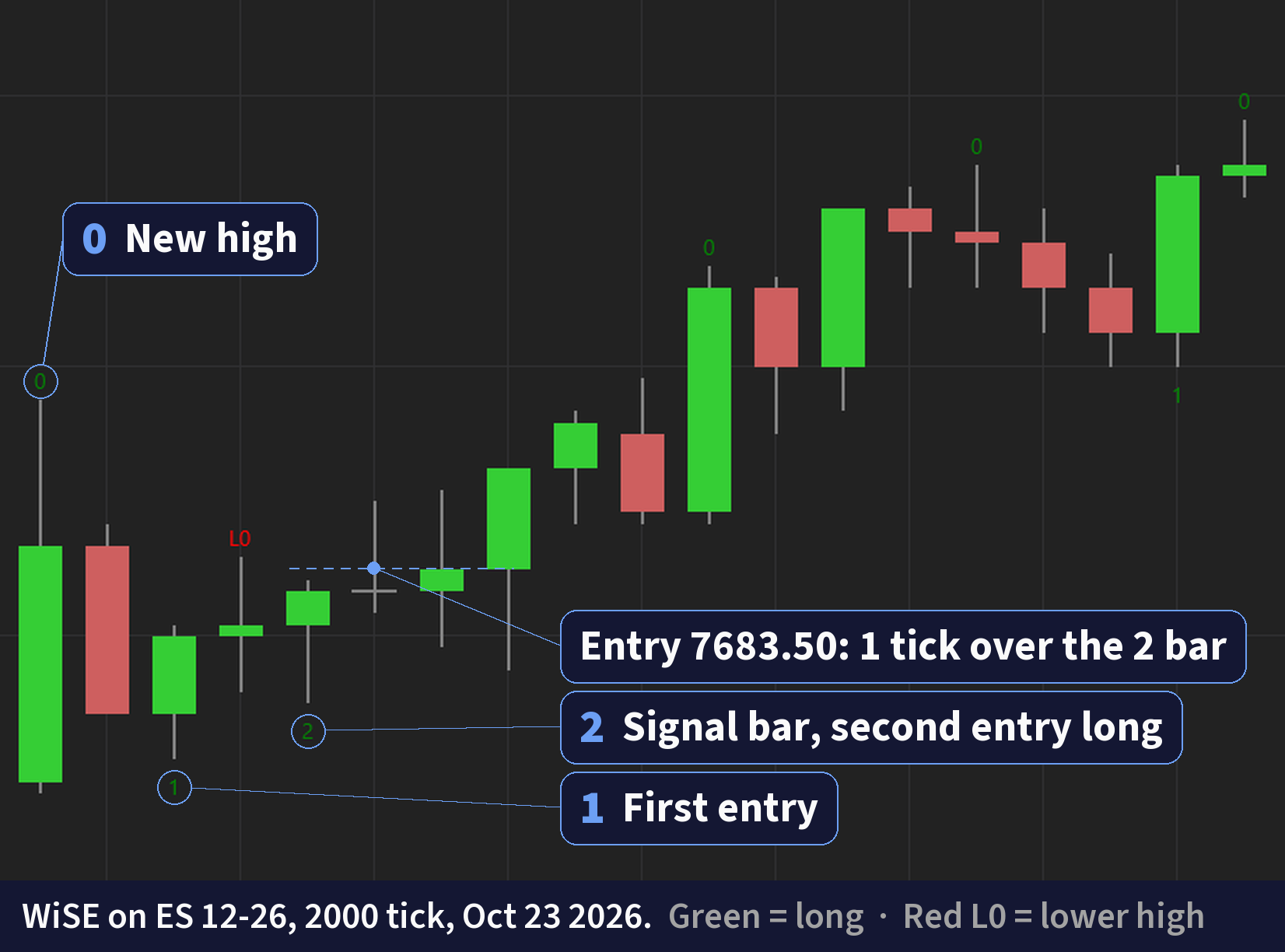
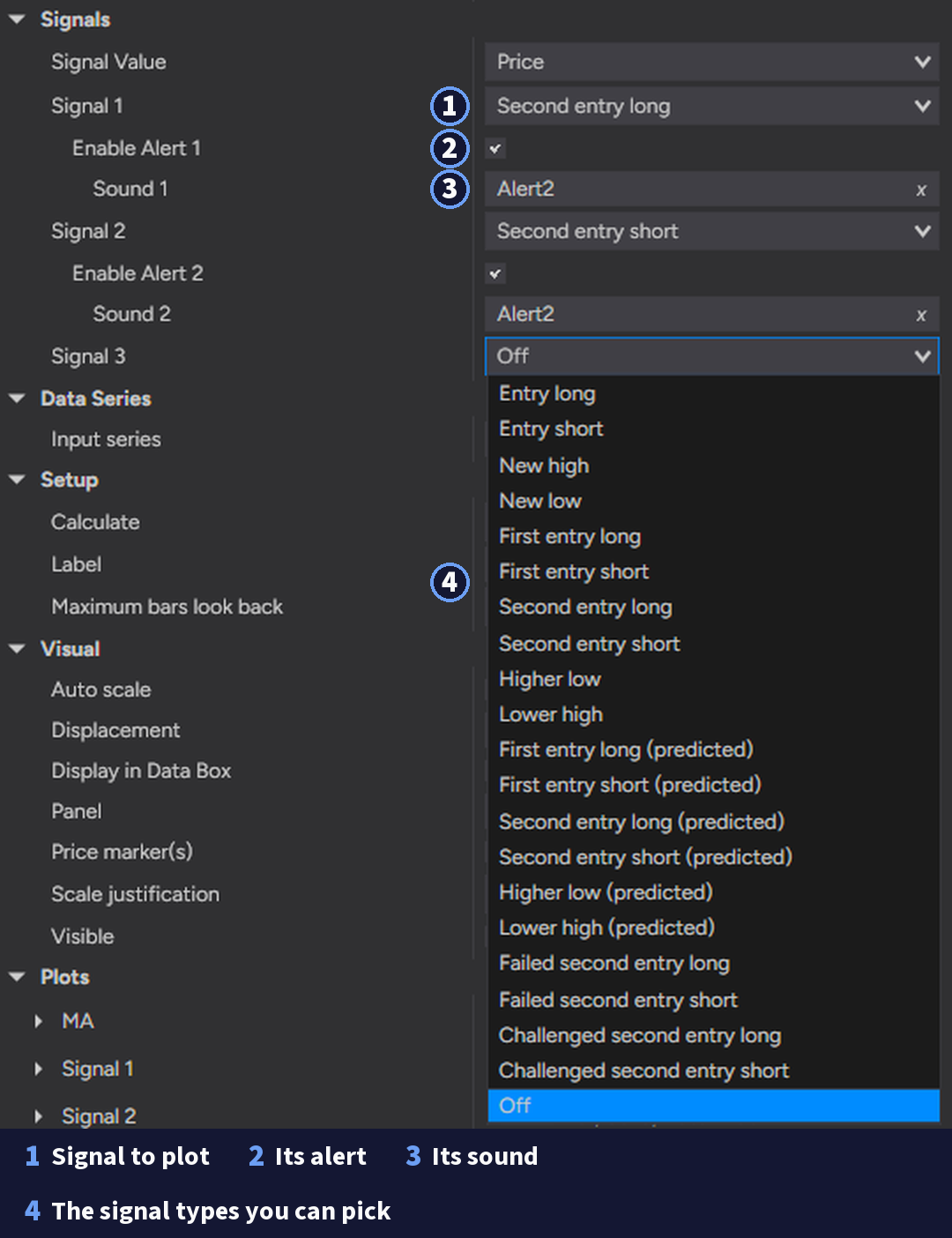
Test it on your own charts.
A demo shows a chart the vendor picked. A trial shows yours. Put the tool on the chart you trade, replay a few sessions on the Playback connection, and write down what it marked and when. Our NinjaTrader 8 indicators post has six questions to ask before you buy any indicator.
About WiSE
The WiSE (Wizdough Second Entry) Indicator is a price action indicator for NinjaTrader 8. It marks more than 16 signals as they print: new highs and lows, first and second entries, higher lows, lower highs and failed entries. It can also draw trend lines and measured move targets from the same swings.
WiSE marks price action setups on your chart. It does not place trades; you decide every trade. Examples are chosen to show how it works, and not every setup works. You can lose money trading futures, even more than you put in. See the full risk disclosure.