Search for the best NinjaTrader 8 indicators and most of what comes back is a vendor's own catalogue with a "best of" headline on top. We sell NinjaTrader indicators too, so read this with that in mind. The aim here is different: tell you which indicators already ship with NinjaTrader 8, which jobs they cover, and how to judge a paid tool (ours included) before you spend money on it.
The short answer, by job
There is no single best indicator. There is a best tool for each job on your chart, and for most jobs NinjaTrader already gives you one for free.
- Trend direction: EMA, SMA, Hull or VWMA moving averages. A paid tool rarely adds anything here, because the maths behind an average is public and NinjaTrader already ships the common ones.
- Key levels: Prior Day OHLC, Current Day OHL and Pivots. Pay only for levels NinjaTrader does not calculate.
- Market structure: Swing, ZigZag and Donchian Channel. A paid tool can help when you want patterns labelled, not just swings marked.
- Volatility and stops: ATR, Bollinger Bands and Keltner Channel.
- Momentum: RSI, MACD, Stochastics and ADX. For this job and the one above, a paid version is rarely worth the money.
- Volume and order flow: Volume, Volume Up Down, and Order Flow+ if your license includes it. Pay only for footprint detail Order Flow+ does not show.
- Order entry and exits: ATM strategies and Chart Trader. A paid tool helps when the mechanics of placing orders cost you trades.
The rest of this guide explains each job and gives you a fair way to test whether a paid tool beats the free one.
The free indicators that ship with NinjaTrader 8
NinjaTrader 8 installs with about a hundred indicators. The official list is long, and most traders use five or six of them. These are the ones worth learning well before you buy anything.
Moving averages. EMA and SMA are the standards. NinjaTrader also ships Hull (HMA), volume weighted (VWMA), Kaufman adaptive (KAMA), zero lag (ZLEMA) and a Moving Average Ribbon. Pick one type, set the length once, and leave it alone. A trader who knows how price behaves around a 21 period EMA on their own chart has more than one who rotates through ten averages.
Levels. Prior Day OHLC draws yesterday's open, high, low and close. Current Day OHL tracks today's. Pivots, Camarilla Pivots and Fibonacci Pivots cover the classic floor levels. Many paid "key level" indicators redraw exactly these lines with nicer colours.
Structure. Swing marks swing highs and lows by a strength setting you choose. ZigZag draws lines between reversals larger than a size you set. Donchian Channel shows the highest high and lowest low over a lookback. Our post on swing indicator strength shows how much that one setting changes what you see.
Volatility. ATR is the one to learn first, because it sizes stops and targets to what the market is doing today. Bollinger Bands and Keltner Channel show the same idea as a band around price.
Momentum. RSI, MACD, Stochastics and ADX are all built in. They are useful as context and poor as triggers on their own.
Volume. Volume, Volume Moving Average and Volume Up Down are free. For more than that, see the next section.
NinjaTrader also ships tools that are not indicators but matter more than most indicators do. ATM strategies attach a stop and a target to every entry automatically. Market Analyzer watches many instruments in one window. The Playback connection replays recorded market data so you can rehearse a session, or trial a new tool, without risking money.
What Order Flow+ adds, and who has it
Some tools that people call standard are not in the free set. VWAP, Volume Profile, Cumulative Delta and Volumetric Bars are part of Order Flow+, which NinjaTrader includes with a lifetime license. If you are on the free version and a vendor's video shows VWAP or a volume profile on the chart, you may not have those studies yourself. Check your license before you buy a third party order flow pack, because a lifetime license may already cover what you need.
Six questions to ask before you buy any indicator
Once the free tools are set up, you will know which problems they leave unsolved. That is the only good reason to buy something. Put every candidate through these six questions.
- Does it repaint? A mark that moves or disappears after its bar has closed makes a chart look brilliant in hindsight. Ask the vendor in writing what their tool does after a bar closes. Also ask how it runs during a bar. An indicator set to calculate on each tick can show a mark mid bar and remove it before the close, which is normal as long as the vendor says so. Our post on Calculate modes explains the difference.
- Is there a real trial? You should be able to run the tool on your own charts, with your own instruments and bar types, before you pay. A demo video shows the vendor's best day, not yours.
- What does it cost your computer? Heavy indicators on fast tick charts can slow the whole platform, and they slow it most when the market moves fastest. Watch CPU use during the trial, on a busy open, not a quiet afternoon.
- Is there real documentation? A manual that explains every setting is a good sign of the support you will get after you buy. If the only documentation is a sales video, expect the same from support.
- Does it work with your bar type? Plenty of tools assume minute bars. If you trade tick, volume or range bars, confirm it works on them and that the settings make sense there. Our post on tick charts vs time charts covers why the bar type changes what an indicator shows you.
- What are the price and license terms? Look for a published price, the renewal terms, and how many computers the license covers. A tool that needs updates for new NinjaTrader versions needs a vendor who is still around to make them.
How to run a fair trial
Import the tool through Tools, Import, NinjaScript Add-On in the NinjaTrader Control Center, and only import files from vendors you trust. Then put it on the same chart you trade, next to the free tools you already use. Replay a few recorded sessions on the Playback connection and write down, bar by bar, what it showed you. Then run it live on a sim account for the rest of the trial. If it does not change a decision you make, it has not earned its price.
The categories that earn chart space
Most paid NinjaTrader tools fall into one of four groups. Each solves a different problem, so decide which problem you have before you compare products.
Signal and price action tools mark patterns you would otherwise count by hand: swing structure, pullback counts, entry setups. The value is consistency, because the same definition gets applied on every bar of every session. Our WiSE indicator is in this group, and there is more on it below.
Order placement and trade management tools reduce the mechanical errors between the decision and the fill: chasing price, a stop at the wrong level, a bracket left off. NinjaTrader's ATM strategies handle the bracket for free. Tools like our ATM Whisperer go a step further and place the entry order itself at a price taken from an indicator on your chart.
Chart configuration tools solve quieter problems. Micro contracts do not print trades at the same rate as their full size contracts, so a 2000 tick MES chart does not look like a 2000 tick ES chart. Tick Chart Compare works out the matching interval, and it is a one time purchase rather than a subscription. The MES tick chart settings post explains the problem in detail.
Order flow tools show the traded volume inside each bar. Check what Order Flow+ gives you first. Buy a third party footprint or delta tool only when you can name the thing Order Flow+ does not show you.
You can see all our tools, with prices, on the products page.
Where WiSE fits
WiSE, short for Wizdough Second Entry, marks price action signals on a NinjaTrader 8 chart as they form: first entries, second entries, higher lows, lower highs and failed second entries, 16 or more signal types in all. It works on any bar type. It is built for traders who already trade pullbacks and are tired of counting legs by hand, and it will not help much if you do not.
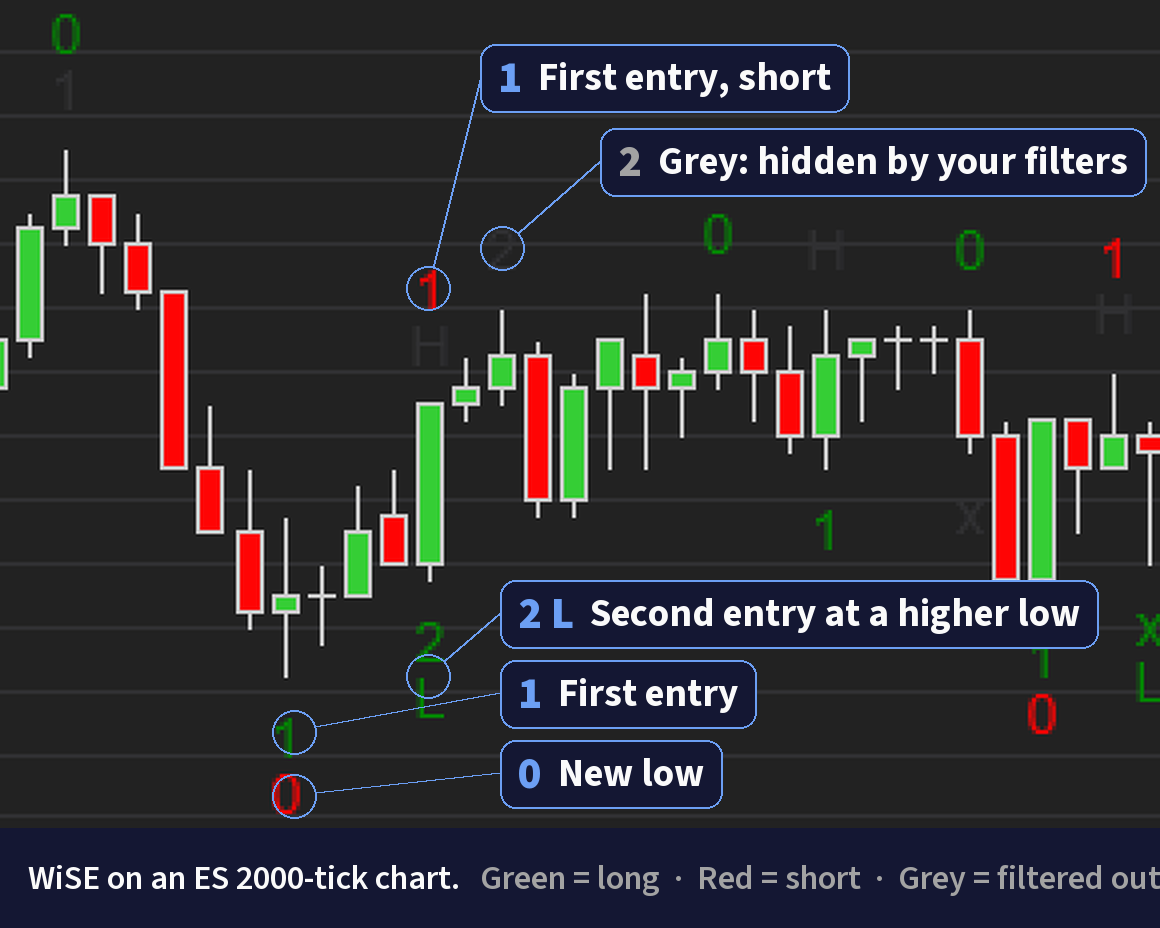
If second entries are new to you, start with the free second entry trading guide and count them by hand for a week before you look at any tool. If you then want the count done for you, WiSE has a 7 day free trial on a first subscription. Put it through the same six questions as anything else, repaint included, on your own charts. It is a charting tool. It does not trade for you, and it does not make a setup work more often than it does.
Red flags worth respecting
- Profit or win rate claims, especially without a hypothetical performance disclaimer. Futures marketing rules require one, so its absence tells you something about the vendor.
- "Works on any market, any timeframe, with a 90% win rate." No indicator does.
- No published price. If you have to book a call to learn the cost, the cost is whatever they think you will pay.
- A lifetime license from a vendor with no history of updates. NinjaTrader keeps changing, and an abandoned tool eventually breaks.
- A trial that only runs on the vendor's own template or on a replay they chose.
A sensible order to build your chart
- Set up an ATM strategy so every trade has a stop and a target from the first fill.
- Add one moving average and the day's levels (Prior Day OHLC and Current Day OHL).
- Add ATR, and size your stops from it.
- Trade that chart on sim, or on Playback, for two weeks and write down every mistake.
- Only now look at paid tools, and only for the mistake that keeps coming back. Trial one tool at a time.
Frequently asked questions
What are the best NinjaTrader 8 indicators?
For most traders the best NinjaTrader 8 indicators are free ones that ship with the platform: a moving average such as the EMA, Prior Day OHLC and Current Day OHL for levels, Swing for structure, and ATR for stop size. Add a paid indicator only when it solves a problem those tools leave open.
Which indicators come free with NinjaTrader 8?
NinjaTrader 8 ships with about a hundred indicators, including SMA, EMA, Hull and VWMA moving averages, Bollinger Bands, Keltner Channel, ATR, ADX, RSI, MACD, Stochastics, Pivots, Prior Day OHLC, Current Day OHL, Swing, ZigZag, Donchian Channel and several volume indicators. NinjaTrader publishes the full list in its help guide.
Is VWAP free in NinjaTrader 8?
VWAP is not in the free indicator set. NinjaTrader's VWAP is Order Flow VWAP, part of Order Flow+, which NinjaTrader includes with a lifetime license. The same applies to Volume Profile, Cumulative Delta and Volumetric Bars.
How do I install a third party indicator in NinjaTrader 8?
In the NinjaTrader Control Center open Tools, then Import, then NinjaScript Add-On, and choose the zip file the vendor gave you. Only import files from vendors you trust. The indicator then appears in the Indicators window of any chart.
What does it mean when an indicator repaints?
An indicator repaints when a signal it showed on a closed bar later moves or disappears. That makes past charts look better than what you saw live. A mark that appears during a bar and goes away before the bar closes is a different thing, and a good vendor explains which one its tool does.
Are paid NinjaTrader indicators worth it?
Some are, for a specific job. A paid indicator is worth it when it removes a mistake you keep making, such as a missed setup or a wrong order, and when a free trial on your own charts shows it does that. If a free built in indicator does the same job, it is not worth paying for.
Futures trading involves substantial risk of loss and is not appropriate for all investors. Past performance is not indicative of future results.
Get the trading tool updates.
New releases, setup guides, and the occasional NinjaTrader tip. Roughly once a month.