WiSE provides alerts on two-legged pullback status, enabling you to identify more than 16 different price action signals — second entries, higher lows, lower highs, and failed second entries (traps). It's based on Mack's adaptation of Al Brooks' original technique.
See the count on a chart
The core signals
WiSE marks signal bars directly on the chart:
- 0 — New high / new low. When a new high is followed by a higher high, WiSE labels it zero (0).
- 1 — First entry. The first entry signal bar.
- 2 — Second entry. The second entry signal bar.
- H# — Higher low / L# — Lower high. H marks a higher low, in green below the bar. L marks a lower high, in red above the bar. The # is a counter that starts at 0, so the first higher low in a row shows as H0 and the next as H1. Max count HL/LH sets how many you see; the default of 1 shows only H0 and L0. Identified between the zero (0) and second entry (2) signals. In the right context these can also be used as entry points.
These numbers are displayed at signal bars because they provide crucial information for placing stop orders.
Challenged and failed entries
WiSE tests second entries (SE) for success or failure against your Profit Target setting:
- Successful SEs are marked (2).
- If an SE doesn't reach the profit target and then breaks the prior bar in the opposite direction, it's marked challenged (c).
- If it then breaks the implied stop behind the SE signal bar, it's marked failed (x).
By default WiSE stops watching an entry for a fail once it moves Profit Target plus 2 ticks in its favor. With measured move targets on, Watch for fail until can keep the watch going until price reaches the target or the entry fails. See the Settings Reference.
Color coding
- Grey symbols — hidden signals that were filtered out based on your settings.
- Yellow symbols — predicted signals. A yellow (2) means the second entry is expected as soon as a bar breaks the previous bar. When that happens, the (2) changes to green or red depending on whether it's a long or short entry signal.
- Green / red symbols — confirmed long / short entry signals.
By understanding these signals and their color coding, you can better analyze price action and make more informed trading decisions.
Measured move target
Turn on Show Measured Move (settings group Measured Move) and WiSE projects a target from each second entry that is not filtered. The target is a projection only. It shows where the next leg would end if it were as long as the leg before it. Price can stop before the target or run past it.
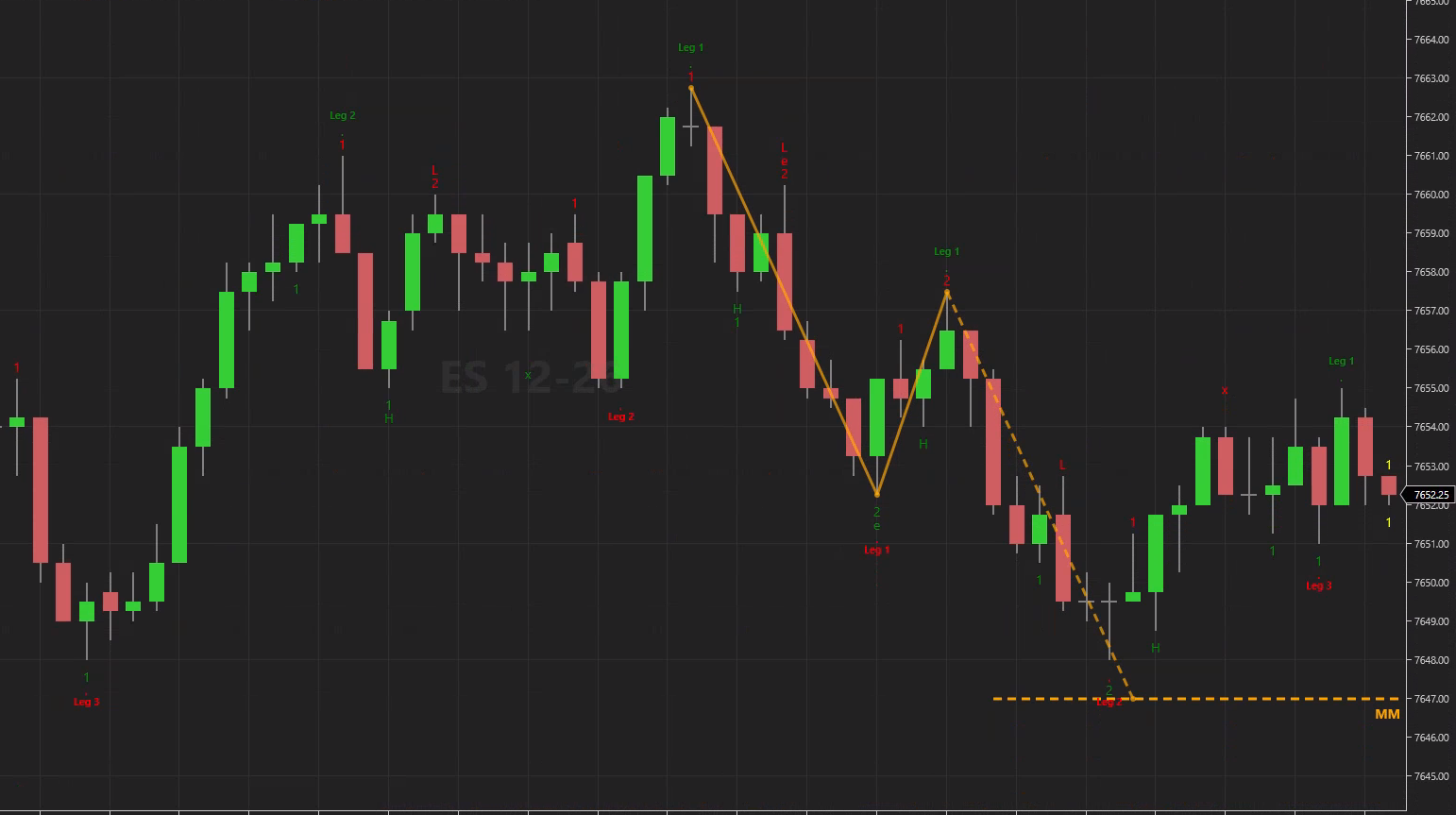
How WiSE finds the target, for a long (a short is the mirror):
- The leg. The leg is the move that made the new high, the green zero (0). It starts at the low of the last red zero before it. If there is none in the 100 bars before the zero, WiSE uses the lowest low of those bars.
- The pullback. The pullback low is the lowest low from the zero to the second entry (2). Pullback low from can start the search on the bar after the zero instead.
- The target. Target = pullback low + the size of the leg. For a short: pullback high minus the size of the leg.
What you see on the chart:
- No target when the pullback goes past the leg start. If the pullback low is at or below the start of the leg, the pullback took back the whole leg, and WiSE draws no target.
- The target is set when the 2 bar closes and never moves. The dashed line starts on the next bar, with the label MM2. It stops at the bar that touches the target, or after Line length bars.
- Failed targets are hidden by default. If the entry fails (x) before price reaches the target, the target has failed. With Show failed targets Off (the default), WiSE hides failed targets, and MMs to show counts only targets that did not fail. With Show failed targets On, failed targets stop at the fail bar, turn grey, and count toward MMs to show.
- The zigzag shows the math. Four points: leg start, zero, pullback low and target. The two real moves are solid lines. The projection from the pullback to the target is dashed.
With Measure from set to First entries or Both, first entries get a target too, from the pullback between the zero and the 1. Their label is MM1. Every setting is in the Settings Reference.
Who WiSE is for
- New traders learning to count second entries can display all signals before and after the second entry — feel every move and learn to count even without the indicator.
- Pro traders can set up WiSE to display only the signals they need, and use the flexible alerts system to get ready for the next trade.
- Algo traders can drive automated strategies from WiSE's signal plots — see using WiSE in automated strategies.
Next: cut the noise with filters.
WiSE
Master the Art of Identifying Second Entries. $25/mo · 7-day free trial.