
Your prop firm drawdown, on your chart.
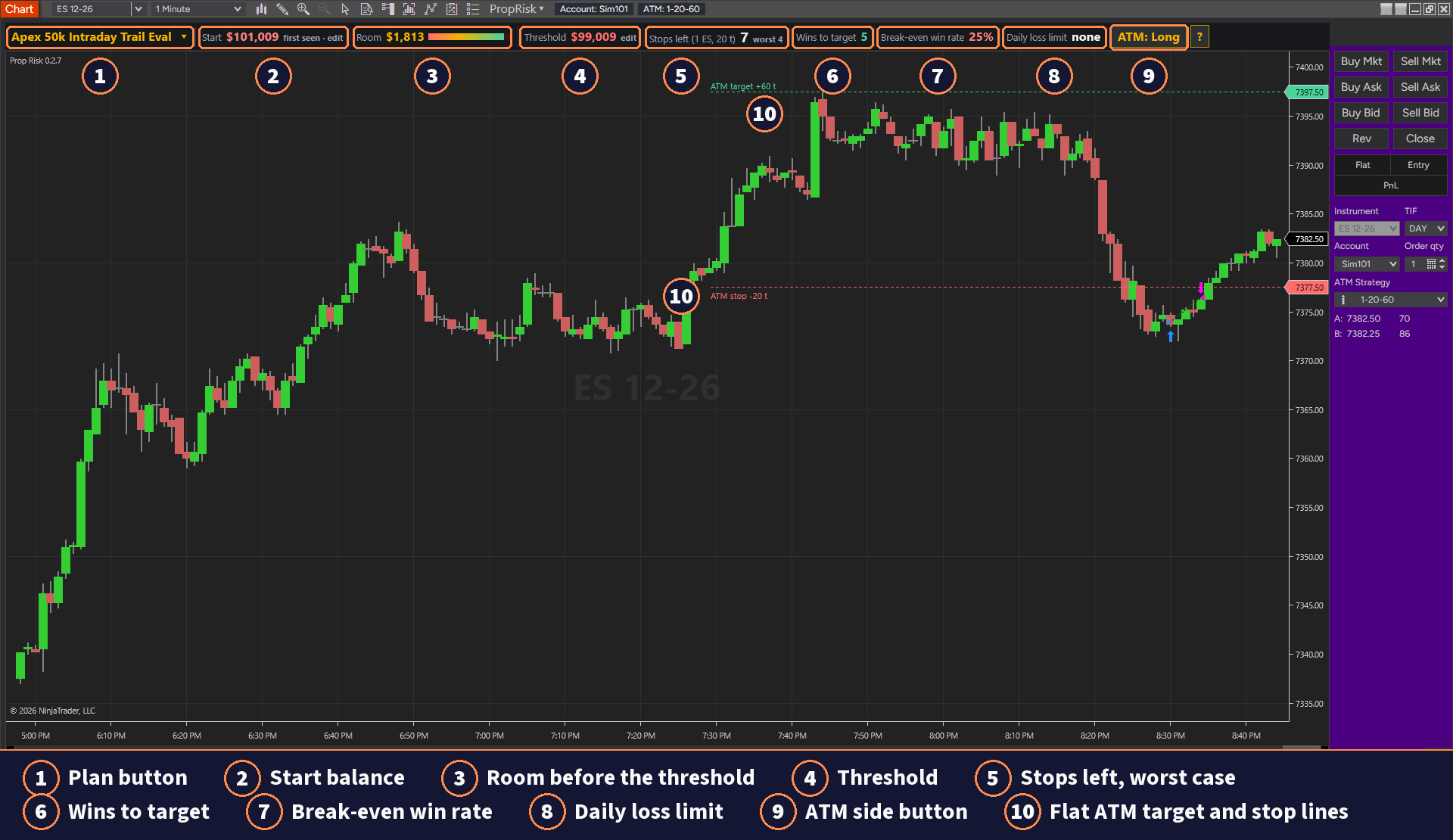
Prop Risk is an indicator for NinjaTrader 8. It adds a thin strip above your chart with the dollars left before your firm's liquidation threshold, and draws the liquidation line on the chart. Pick your firm and plan from the built in presets, or type your own numbers.
Free with a Wizdough account
Create a free account and confirm your email. Then download Prop Risk from your dashboard and import it in NinjaTrader 8. There is nothing to unlock.
Prop Risk is a risk display tool. It is not trading advice, and it cannot stop you from trading.
Your drawdown, in trades.
Room and threshold
Free
The Room cell shows the dollars left before the liquidation threshold, with a bar that gets shorter as the room goes. The number turns red when less than a quarter of the drawdown is left. The Threshold cell shows the line itself and says locked once the line stops trailing.
Liquidation line and drawdown box
Free
In a position, a dashed red line marks the price where your equity would touch the threshold, and a green line marks the profit target. A small box on the chart draws your balance against the threshold over time.
Daily loss limit
Free
For plans with a daily loss limit, the strip shows what is left of it today.
Stops left
Prop Risk Pro
The big number is how many stop outs you can take at your current size, for example 1 ES with a 20 tick stop. On an intraday trail plan a second number gives the worst case: each trade runs up close to its target first, which moves the line, and then stops out.
Wins to target
Prop Risk Pro
This cell counts the winning trades you still need to reach the profit target. Beside it, the strip shows the win rate this ATM needs to break even after commission, in red when it is above 70%.
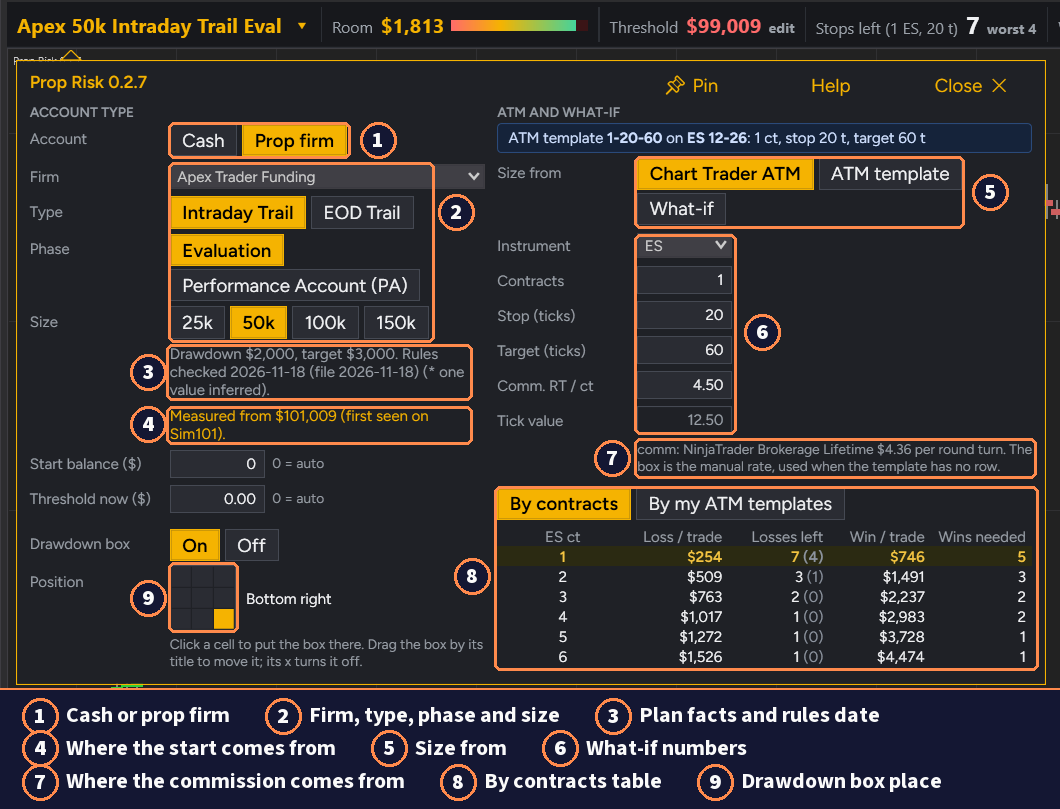
Pick Cash for your own money, or a prop firm plan from the list: Apex Trader Funding, Topstep, Take Profit Trader or Tradeify, by program, phase and size. Other (custom) takes your own numbers. The strip updates 4 times a second from your account.
Pro counts with your trade size: the ATM template in Chart Trader, a saved ATM template, or a what if size you type, with contracts, stop and target in ticks.
Free on your chart. Pro for planning.
Prop Risk, free
- Room in dollars before the liquidation threshold
- The Threshold and the liquidation line on the chart
- The daily loss limit left today
- The profit target line
- The drawdown box
- Firm presets: Apex Trader Funding, Topstep, Take Profit Trader and Tradeify, or your own numbers
Free with a Wizdough account.
Prop Risk Pro
Everything in the free version, plus:
- Stops left at your ATM size, with the worst case, and What-if sizes
- Wins to target and the break-even win rate
- The By contracts table
- Trade BE, the break-even price of your trade with commission
- The ATM origin levels
- The date we checked each firm's rules
Prop Risk Pro is not available yet. The free version works now.
What it draws.
A display, not advice.
Prop Risk is a risk display tool. It is not trading advice, and it cannot stop you from trading.
Firms change their rules, so check your own firm's rules and the numbers on its dashboard. For a firm with no commission rate on file, the strip uses the rate you type.
Guides
Runs on NinjaTrader 8
Trading futures and forex involves substantial risk of loss and is not suitable for all investors. Past performance is not indicative of future results. See our full risk disclosure.