2.16.0 — 2026-11-04
Changed
- Internal cleanup so our indicators install side by side without conflicts. Your settings, saved charts and signals stay the same.
Fixed
- A valid licence no longer opens the license window after a short passing error, for example when the licence file is busy for a moment (licence library WiLicensor 1.1.2.0, also in the SweepScope, Order Block Scope, Tick Chart Compare and All Access downloads).
- When the licence check cannot run, the chart note shows only that message.
No trading rule changes: the same bars get the same signals and stops, and the signal export file is unchanged.
2.15.0 — 2026-10-31
New
- Help group at the top of the settings, with Version, Open documentation and Support. When WiSE loads on a chart, it checks wizdough.com for a newer version in the background, so the chart does not wait for it. The Version row then says latest, names the newer version and adds an Install row, or says check failed. Install opens the download and shows the three import steps; it never closes NinjaTrader.
- Right-click on the chart for the Wizdough menu: one row for each of our indicators on the chart (Getting started, What's new, and Install when there is a newer version), plus our website, support and YouTube.
- The chart label, the Configured list and the Data Box show the name and the version only, for example WiSE 2.15.0.
The check asks for our public product page and sends nothing else. No trading rule changes: the same bars get the same signals and stops, and the signal export file is unchanged.
2.14.0 — 2026-10-31
New
- With Calculate = On each tick, a 1 or 2 whose entry bar is still forming, its outside bar e, and a c made on the forming bar are drawn in the Unconfirmed color until that bar closes. Then they take their normal color, or go if the closed bar does not make them. A symbol in its normal color does not move or go away later. Setting: Forming bar signals in Unconfirmed color (Appearance group, on by default). See Known limits.
- Alert on bar close (Signals group, off by default). With Calculate = On each tick and this on, an alert of a signal found while its bar is forming waits for the bar close, and a signal the closed bar does not keep never alerts. Predicted signals then alert only on a slot set to a predicted type. The Signal plots that strategies read do not change.
No trading rule changes: the same bars get the same signals and stops, and the signal export file is unchanged.
2.13.0 — 2026-10-30
New
- Export pending entries (Signal export group, off by default). When it is on, the signal file also lists each entry WiSE will take if the next bar breaks the high (long) or low (short) of the last closed bar: trigger, entry price and stop. Then it shows what happened to it (filled, voided, cancelled or changed). Your trading bot can place its stop order before the entry bar.
- Color theme setting (Appearance group): Classic, Wizdough or Cyberpunk. New charts use the Wizdough theme; existing charts keep their look and can switch in Color theme.
Changed
- Settings in WiSE now use the same names as our other indicators; your saved charts keep working.
Fixed
- A missing or expired licence no longer freezes NinjaTrader. The chart loads and shows a short note until the licence is fixed. If a licence window is open, finish it there (it may be behind NinjaTrader).
2.12.1 — 2026-10-26
Fixed
- Show filter names: every name is now drawn in full, centred under its bar, and stays inside the chart at the left and right edges. Before, a name wider than the space between two bars was cut at the bar's edges (for example "Colo" for Color). Near the top or bottom edge, or when names would overlap, a filter name is hidden; scroll or zoom to see it. The 2 mark always stays readable.
2.12.0 — 2026-10-26
New
- Show filter names (off by default, in Appearance, and a check box in the chart panel's Entries and symbols section): every symbol drawn in the Hidden color gets the short name of each filter that hides it, in the bar's own column after its symbols: Max risk, Close %, Wick, Color, MA, Channel, Inside bar, 0/1 (Hide 0/1 without 2), Long off / Short off. A name wider than the bar spacing is cut at the bar's edges; zoom in to read it. It only draws: signals, plots and alerts stay the same. See Filtering Signals.
- Midline width (default 1, in Channel, shows while Show channel midline is on): the width of the dashed midline.
Changed
- Hide Entries by channel now uses only the channel lines the chart showed when the signal bar closed (Lines to show per side, Show ended lines, Which lines and Require 3 touches all count). With the filter on, some second entries that were grey because of a line the chart did not show are now kept, and a few are now grey because the chart shows only the other side's channel there. A past bar's lines can later leave the chart when newer lines push them out of Lines to show per side; the second entry keeps its state. With the filter off nothing changes.
- Line width of the trend and channel lines is now 5 by default on new charts. Charts and templates you saved keep their width.
Fixed
- Signal export: the "wise" field of every row now always shows the WiSE version that runs.
Signal export: the start and stop rows also record lines_per_side, which_lines, require_3_touches and show_ended_lines.
2.11.0 — 2026-10-26
New
- Signal export (off by default, new group Signal export): WiSE can write the entries it shows to a file, live, for bots, journals and spreadsheets. One JSON Lines file per instrument, bar type and trading day in
Documents\NinjaTrader 8\WiSE\signals. Include history also writes the bars loaded before real time. Keep signal files (days) (default 30) deletes the export's own old day files; 0 keeps all. See Signal export. - Chart panel: Panel position picks the corner (Top left, as before, Top right, Bottom left, Bottom right). You can also drag the panel by its WiSE title row. The place is saved with the workspace and in templates, and the panel stays inside the price panel when the chart gets smaller.
- Chart panel: new rows Hide Entries by channel (Channel section; behind more: Max position in channel % and Min channel width for position (ticks)), Hide 0/1 without 2 (Entries and symbols section) and Plot on Chart (MA filter section). They are the same settings as in the settings window.
Changed
- The chart panel is narrower: about 340 px folded, with short summaries such as "3 per side"; rows wrap at about 450 px and scroll inside the panel on a small chart. Fold buttons sit at a fixed place at the left of each row. A row that reloads the chart shows a small circular arrow. Section headers use the setting names. A part that is off has no fold button.
- Hide Entries by Moving Average: the help text now says what it hides.
Signal export is off and Show chart panel is off by default, so your charts, signals, alerts and strategies look and work the same until you turn them on.
2.10.0 — 2026-10-25
New
- Hide Entries by channel (off by default, in Filters): works with Show trend line on. A second entry long is kept only while an up channel is active and its entry (signal bar high + 1 tick) sits in the lower part of that channel, up to Max position in channel % of the channel's width above the trend line (default 50, the midline). Shorts mirror it in a down channel. With no channel line at all, the second entry is kept; with only lines of the other side, it's hidden like with the other filters (grey, no alert, no Signal plot). Only lines known before the signal bar closed count, so live and a reload (F5) show the same marks. See Filtering Signals.
- Min channel width for position (ticks) (default 40, under Hide Entries by channel): Max position in channel % is used only in channels at least this wide, so narrow channels do not hide almost every entry. In a narrower channel, an entry in the channel's direction is kept wherever it sits; a short with only a rising channel is still hidden. 0 = the % rule in every channel.
- Show channel midline (off by default, in Channel): a dashed line halfway between the trend line and the channel line. Min channel width for midline (ticks) skips narrow channels (0 = every line). Drawing only.
- New leg gets its own channel (on by default, in Channel, shows while After a break, reuse the first point is on): while a line from a reused old point is still alive, the trend's own two leg starts now also make a line next to it, so a fresh steep leg gets its tight channel. It only adds lines: the reused line stays as before, and added lines count apart in Lines to show per side. Off draws as 2.09.0.
Fixed
- No more out-of-range error on a chart where the other side hasn't broken out yet. A second entry on that side comes once it breaks out.
- Live and Playback: the inside bar symbol now stays shown while another entry of that bar still uses it, the same as after a reload.
- Entry long and Entry short plots: when two entries share one bar, the plot carries the one with the lowest count, live and after a reload alike.
- Hide 0/1 without 2 now also hides the 1 when no second entry follows, not only its 0, as the setting name says. Plot values and alerts of the 1 don't change.
Both new filter and midline settings are off, so your charts, templates and strategies look the same until you turn them on. New leg gets its own channel is on, so with Show trend line on you may see a few more channel lines.
2.09.0 — 2026-10-14
New
- Rebuild day channel after a break (on by default): when a bar closes through the day's main channel line, WiSE builds a new day line on the same side from that day's swings between 9:30 and 16:00 New York time. With After a break, reuse the first point on, the new line starts from the day's first point if price hasn't traded through it; otherwise it comes from the next two swings after the break, if the second sits 1 tick or more above the first (below it for down lines). The broken line stays on the chart, dimmed, with an "ended HH:MM" label showing when it broke, in your chart's time zone.
- Day channels per side (default 3): the most day lines per side and day, the first one included.
Fixed
- An "Indicator 'WiSE': Error on calling 'OnBarUpdate' ... out-of-range" message could stop WiSE on the first realtime bars (live and Playback). It's gone.
A day that never gets a first day line still gets none. Signals, alerts and plots don't change. Off draws one day line per side and day, as before. If your chart shows the day's main channel (Which lines = Day's main channel or Both), you'll see the new day lines and labels after the update; turn Rebuild day channel after a break off to keep the old look.
2.08.1 — 2026-10-13
- Fixed: the plot values (New high, New low, Higher low, Lower high and the entry plots) now settle when a bar closes. A strategy, alert or Market Analyzer column that reads them now sees the same values live as after a reload (F5). Before, a predicted value could stay on a closed bar, and Higher low or Lower high could land one bar off.
- Alert text: "bars ago" now counts from the current bar.
- No new settings. Saved templates and workspaces keep working.
2.08.0 — 2026-10-13
New
- Trend lines and channels: WiSE can draw the trend line and its channel line from the same swings it uses for the 0, 1 and 2, so the line and the signal always agree. One line per trend run (from the legs Leg count counts), the day's main channel (the first two swings after 9:30 New York time), or both. After a break, reuse the first point (on by default): when a trend line ends, its first point is kept, and the next leg start can make a new line with it if price has not traded past that point. So a new line can draw sooner after a break. Reuse old point: same day only (on by default) uses the kept point only within the same trading day. With reuse off, a new line comes only from the next two leg starts. A later swing near the line gets a dot. Lines are decided on closed bars: once a line's two points are fixed they never move, and a reload draws the same lines as live. Off by default, in the new Channel group, right under Measured Move. Lines to show per side: 3 by default, up to 1000. See Trend lines and channels.
- Chart panel for every part: the floating chart panel now covers all of WiSE, not only the measured move. One panel has a section for Measured Move, Leg count, Channel, Entries and symbols, and MA filter. Each section has an on/off box, a fold button and its main settings. The other settings sit behind more. The new Chart panel settings group has Show chart panel (off by default, moved from Measured Move, your saved value is kept) and one checkbox per part, to pick which sections show. The panel no longer needs Show Measured Move on. A change on the panel is the same as in the settings window and is saved in templates. Signal settings changed on the panel reload the chart like F5, about half a second after the last change: every indicator on the chart reloads, and with a strategy on the chart NinjaTrader asks its usual question. See Use the chart panel.
- Separate fail target: off by default, in Parameters right under Profit Target. On, a second entry is judged at its own target, Fail target (ticks), default 8, instead of the Profit Target. It is watched until price goes Fail target plus 2 ticks in its favor, or until its stop breaks. Reaching the Profit Target does not end the watch, so a second entry that reaches the Profit Target and then breaks its stop before the fail target is a failed second entry (X). The fail target can be smaller or larger than the Profit Target. Both touched works at the fail target the same way. With Watch for fail until = Measured move target or stop, an entry that has a measured move target is still judged at that target. Off gives the same results as before. See Parameters.
- Signal bar quality template: one click greys every second entry whose signal bar has the wrong color, is a doji that closes at its open, or closes outside the top 40% of its range (the bottom 40% for a short). It turns on Hide Entries by color and sets Max High-Close (long) & Close-Low (short) % to 40; everything else stays at the WiSE defaults. See Start from a template.
- Open entries: a second entry that has not reached its target and has not failed yet is drawn faded, so an open trade no longer looks like a win. Successful entries keep the full color, and failed ones show the X as before. Pick Dim (the default), Color (open entries get their own color) or Same (the old look) in the Open entries setting.
- Both touched: when one bar touches both the target and the stop of a second entry, you choose whether that counts as a Fail (the default) or a Success. It works with both Watch for fail until modes. With Tick Replay on, WiSE uses the real order of the ticks instead. See Both touched.
Fixes
- The chart panel now keeps its collapsed state, and the folded state of its sections, after F5 or a reload. Before, the measured move panel opened again on every reload.
- Hide Long Signals and Hide Short Signals now say what they do: those signals stay on the chart in the Hidden Color and do not alert.
- Fewer 1s: a bar that would be a 1 but also goes past the 0 (above the high of the 0 for buys, below the low of the 0 for sells) is now only the new 0, not a 1. You will see about a quarter fewer 1s, and the measured move lines of those 1s are gone too. Every second entry stays as before.
- Custom timeframe: with Calculate on set to Custom, live signals no longer sit one chart bar to the right of where a reload draws them.
- Strategies that read WiSE's Entry long and Entry short values now get the same values live as after a reload: when a bar closes, its value is the one a reload shows, and it is empty if that bar has no 1, 2 or 0. While a bar is still forming, the value can still change. An entry whose alert was blocked by an earlier value on the same bar now alerts once when the bar closes. With Calculate on bar close, the Entry long and Entry short signals alert only on real entries. For an early alert on a predicted entry, use the (predicted) signal types.
- Settings are in a clearer order: the Chart panel group, Measured Move, Channel and Leg count come right after MA Filter, Hide Entries by Moving Average heads the MA Filter group, and Hide Entries by color sits next to the close filter. Your saved templates keep all their values.
- MA Filter: Min Indent and Max Indent are now labelled points instead of ticks. They always measured points (on ES, 2 means 2 points, or 8 ticks), so your saved values keep working exactly as before. See Filtering Signals.
- Hide Entries w Inside Bar now explains what it checks: an inside bar after the pullback's last new low (high for shorts) and before the entry, not the signal bar itself.
- Hide Entries by Max Risk no longer suggests 12, which hides about 90% of second entries on 5 minute ES. The hint now says the value depends on timeframe and instrument, with 40 as a starting point on 5 minute ES.
- Live charts and a reload now end every bar with the same symbols. A 1 or 2 can still show early on a forming bar. When that bar closes, WiSE checks it again the way a reload does: a second entry missed on an outside bar is added with its e, the signal bar and marks of an early entry are corrected, and an entry the closed bar does not make is removed. A correction does not alert again.
- A chart opened, reloaded or reconnected in the middle of a bar no longer treats that unfinished bar as closed, so it cannot change the next second entries.
- Watch for fail until = Measured move target or stop now gives the same result on history, after a reload and live. A historical chart on each tick learned the target one bar late.
- Every entry that reaches its target on a bar now counts as a success, not only the first one.
- When live price makes a c and then an X or a success on the same bar, the c is removed, as a reload shows it.
- Apply filters to HL/LH with the MA filter now reads the MA of the closed bar live, as a reload does.
- Show zigzag off now removes every zigzag line. Before, with Show price on label on, a thin line from the leg start to the zero stayed for each target.
Existing charts load as before, except that open second entries are now dimmed. Pick Open entries = Same to keep the old look. A few live details still differ from a reload; see Known limits.
Updating from an older version: import the new ZIP over it, answer Yes to the replace prompts, and restart NinjaTrader. See Getting Started.
2.04.1 — 2026-10-07
- Fix: in real time and Playback, a second entry that forms on an engulfing bar now moves to that bar, gets the e marker, and is marked failed only when price goes past that bar.
2.04.0 — 2026-10-02
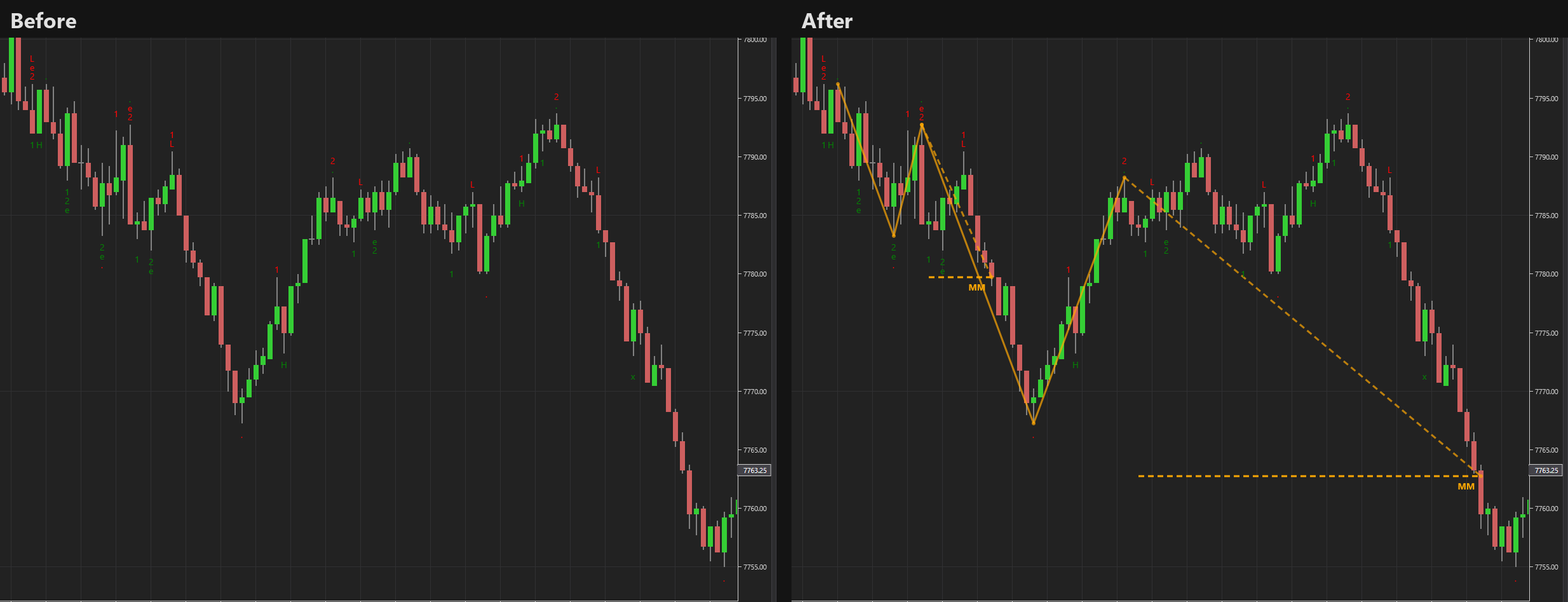
New
- Measured move target on second entries (or first entries, or both): a dashed target line and a zigzag showing how it was measured. Choose how many targets to show, show the price on the label, and pick your own colors.
- Chart panel: change the measured move settings right on the chart; fold it away with one click.
- Leg count: numbers the legs of a trend (Leg 1, 2, 3).
- Higher timeframe: trade a 2000 tick chart while WiSE reads the structure on, for example, 10000 tick bars.
- Require higher low: count a second entry only when its pullback holds above the first one.
- Watch for fail until the target: keep watching an entry for a fail until it reaches its target.
- Seven new chart templates, including Measured move, Higher timeframe and Video 1 rule.
- Cleaner settings: readable names, alerts sit under each signal, and unused rows hide.
Fixes
- Max towards trade wick size now works on short entries.
- Alert messages showed a price where the bar count belongs; each signal now alerts once.
Existing charts load as before. All new features are off until you turn them on.
Updating from an older version: import the new ZIP over it, answer Yes to the replace prompts, and restart NinjaTrader. See Getting Started.
2.02.5 — 2026-09-13
- New: licensing moved to the current Wizdough license service, with an online check and server side trials
- Fix: the license check now runs only when the indicator is configured, so the license window no longer appears while defaults load
- Fix: license problems are written to the NinjaTrader log with the product name before the indicator refuses to load
- Fix: signal plots 11 and 12 did not auto size
- Fix: the indicator now reports its version to NinjaTrader (Tools → Remove NinjaScript Assembly shows it)
Updating from an older version: import the new ZIP over it, answer Yes to the replace prompts, and restart NinjaTrader. See Getting Started.
2.02.1 — 2023-09-08
- Fix: signals did not match the actual entry
- Fix: color filter filtered doji bars
2.02.0 — 2023-08-28
- Fix: predicted yellow symbols show up in Strategy Analyzer
- Fix: first entry tested and marked as failed when "Dual Break Entry Index" = 1
- New: apply filters to HL/LH when applicable
- New: option to apply filters to Failed/Challenged Entries
- New: max towards trade wick size — hide bars whose wick pointing in the trade direction is longer than specified
- New: hide entries by Moving Average — hide if Close is indented from the MA
2.01.3 — 2023-08-13
- New: signal and alert for predicted entries (FEL_predict, FES_predict, SEL_predict, SES_predict)
- New: predict LH/HL
- New: better signal names
2.01.2 — 2023-06-29
- Fix: Hide Risk works incorrectly
- Fix: Hide 0/1 works incorrectly
2.01.1 — 2023-05-25
- Fix: Max High-Close and Min Low-Close won't work
- Fix: inside bar won't hide
- New: hide entries by color
2.01.0 — 2023-03-04
- Performance improved
- Alerts redesigned
- Plot signals redesigned
1.01.0 — 2020-03-04
- Failed and survived second entries
- Internal bars
- Risk check filter
- Bar quality check filter
- Double top / double bottom reset
- Symbol customization
- Six plots for alerts and automated strategies (FEL, FES, SEL, SES, HL, LH)
- Improved prediction of next symbols
1.00.5 — 2020-02-02
- Pro version available (Pro features: sell/buy signals for use in strategies)
- Optimized properties; removed duplicated configurations
- Added symbols for long and short signals — instead of just "2", you can use ↑ and ↓ or any other symbol

WiSE
Price action, trend lines and measured moves. $25/mo · 7-day free trial.