You are long one contract with a stop below and a target above. It is late, the trade has room, so you leave both orders working and close NinjaTrader. The next morning the account shows the stop filled overnight, which is fine, that is what a stop is for. It also shows a short position you never entered, opened later at the exact price of your target.
A trader described exactly this on the NinjaTrader forum this month and reported it as a bug. It isn't one. The platform did what its own help guide says it does, in two short sentences on a page most traders never open.
Two things happened, and they live in different places
The help guide page is called Where do your orders reside? For the NinjaTrader connection it answers two separate questions.
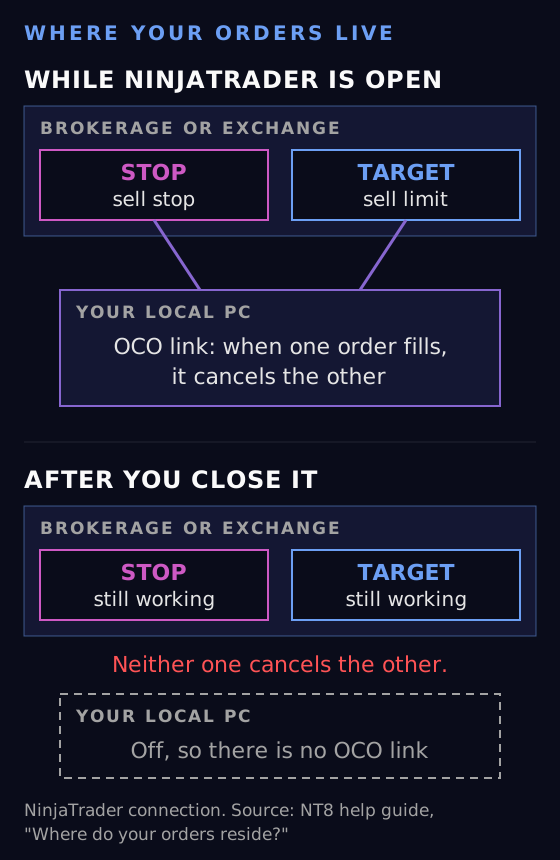
The first is where the orders are. Orders in an Accepted, Working or Suspended state "are at the brokerage or exchange". Your stop and your target were both sitting on a server that has nothing to do with your computer. Closing the platform did not touch them, so both kept working all night. That is why the stop could fill while the app was shut.
The second is where the bracket is. A bracket is two orders plus a rule: when one fills, cancel the other. That rule is called OCO, One Cancels Other, and on the same connection the guide says "Most OCO (One Cancels Other) functionality is simulated on your local PC."
So the orders were at the exchange, and the rule that tied them together was on your desk. When you closed the platform, the rule stopped running. The orders did not.
The sequence, step by step
Put those two sentences together and the overnight surprise is simple mechanics:
- You close NinjaTrader with a long position, a working sell stop below and a working sell limit above.
- Price drops through the stop. The stop fills at the exchange and you are flat.
- On your PC, the OCO logic would now cancel the target. Your PC is off, so nothing cancels it.
- The sell limit is still a live order. It has no idea the position it was protecting is gone.
- Later, price rallies to the target. The sell limit fills, and a sell with no long to close is a new short.
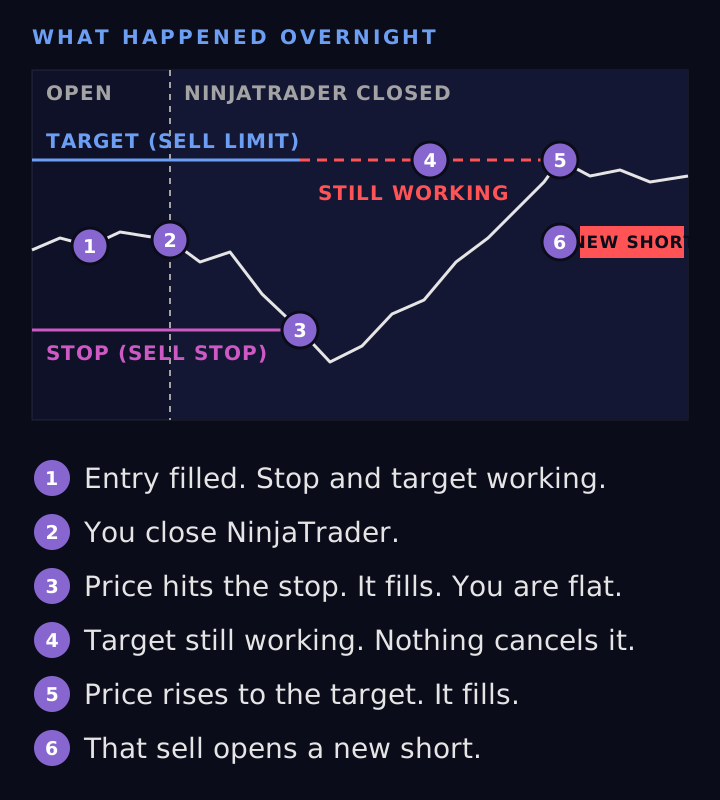
Each order did what an order at the exchange is supposed to do. The one step that never happened, cancelling the target, was the step that needed your computer to be on.
The same thing can happen the other way round. If the target fills first and price then falls back through the stop, the leftover stop opens the short instead. Either leg can be the one left behind.
Check your own connection
The OCO part depends on who you connect through. The help guide lists each connection, and the answer is not the same across them. As the page states it:
- NinjaTrader: orders at the brokerage or exchange. "Most OCO (One Cancels Other) functionality is simulated on your local PC."
- Continuum/CQG: orders at the brokerage or exchange. "Most OCO (One Cancels Other) functionality is natively supported on their servers", with a pointer to a disclaimer on NinjaTrader's support site.
- FOREX.com/City Index: orders on FOREX.com servers. OCO "is simulated on your local PC."
- FXCM: orders on FXCM servers. OCO "is natively supported on their servers."
- Interactive Brokers: orders at the brokerage or exchange. OCO "is natively supported on their servers."
- Rithmic: orders at the brokerage or exchange. OCO "is simulated on your local PC."
- TD Ameritrade: orders at the brokerage or exchange. OCO "is natively supported on their servers."
Read the wording closely. "Most" appears on the NinjaTrader and CQG rows, so even a server side OCO is not promised for every case, and CQG's entry points to a disclaimer. "Simulated" means the platform does the cancelling itself, and it can only do that while it is open and connected.
The page ends with one more note worth knowing. MIT orders and simulated orders sitting in a TriggerPending state "could not be recovered by NinjaTrader, if the provider does not provide native support", and their state after the connection comes back is shown as Unknown. So brackets are not the only orders a closed platform can leave in doubt.
If you are not sure which connection you use, it is the name on the connection you log into from the Control Center. Find it in the list above before you trust a bracket overnight.
What to do before you close the platform
If your connection simulates OCO locally, a bracket needs one of these before you walk away.
Leave it running. If the platform stays open and connected, the local OCO keeps doing its job. This is the simplest fix. It does mean the machine has to stay on, awake and online for as long as the bracket is working.
Close the position and cancel the bracket first. If you are going to shut down, go flat and make sure both legs of the bracket are gone before you do. Check the Orders tab after you close the position, not before. An order left in Working there is an order that can still fill tomorrow.
Use server side brackets, if your account qualifies. NinjaTrader has a setting that moves ATM brackets off your PC. Their support article on it, last updated 8 December 2025, says it "allows the orders and functionality associated with your ATM strategies to reside on NinjaTrader's servers rather than on your local PC", and that the OCO "will all continue to function as expected even if your platform is disconnected."
That is the fix for exactly this problem. Read the conditions before you rely on it, because the same article lists them plainly:
- It is in beta and it is not enabled by default. You turn it on under Tools > Settings > Strategies > ATM Strategies, with "Use Server-Side ATM (beta)."
- It is "only available for NinjaTrader Brokerage accounts."
- It cannot be enabled while the Multi-Provider option is active.
- Your existing ATM templates are not compatible. You create new ones, and changes are not synced between the two kinds.
- A long list of features is not supported with it, including simulated stop orders, placing OCO orders with ATMs attached, scaling in or out of an active ATM, and two or three step auto trail.
If your account is not a NinjaTrader Brokerage account, the setting is not for you, and the first two options are the ones you have.
What this means for anything that places orders for you
Every tool that submits orders from inside NinjaTrader is subject to the same rules, including ours. So here is exactly what ATM Whisperer does when the platform closes, read from the shipped NinjaScript rather than from memory.
It places the entry as an ordinary order on the Chart Trader account. If an ATM strategy is selected in Chart Trader, it hands the entry to that ATM strategy. If not, it submits the order on its own. From that point the order is a normal NinjaTrader order and follows every rule on the help page above.
It never cancels anything itself. When the indicator shuts down, its only cleanup is to stop listening for order updates. An order drops out of the set it manages only when the account reports that order finished: filled, cancelled or rejected. Close the chart or the platform with a Whisperer entry still working, and that entry stays exactly where it was.
It also stops following the level. Repricing happens on bar updates while the indicator is running. With the platform closed there are no bar updates, so a working entry sits at its last price instead of tracking the plot.
None of that is a problem if you know it. It is the same answer as above: flat and cancelled before you close, or leave it running.
The short version
The orders were never on your PC. The rule that cancels one when the other fills usually is. Look up your connection on the help page, and if the answer says "simulated on your local PC", treat a working bracket as something the platform has to stay open to manage.
Futures trading involves substantial risk of loss and is not appropriate for all investors. Nothing here is advice about any specific trade or account.
Get the trading tool updates.
New releases, setup guides, and the occasional NinjaTrader tip. Roughly once a month.