Price pokes above yesterday's high. The stops above it fill, the bar stretches up, and for a minute nobody watching can say what it is. Maybe it's a sweep, and price is about to drop back under the high. Maybe it's a run, and the high was just the first thing in the way.
While the bar is open, the two look the same. They split at the close.
In the video we mark sweeps by hand, next to what SweepScope marks. This post is about the one thing both of them wait for: where the bar closes.
Two names for the same first move
A liquidity sweep is a move through a level where stop orders are likely to rest, such as a run of equal highs or the prior day's low, that then comes back to the other side. The orders past the level get filled, and the move does not carry on. You'll also hear it called a stop hunt or a liquidity grab.
A liquidity run starts the same way. Price trades through the level and the stops fill. Then price keeps going, and the level turns out to be a breakout point, not a turning point.
Both take the liquidity. Only the closes that follow show which one you're looking at.
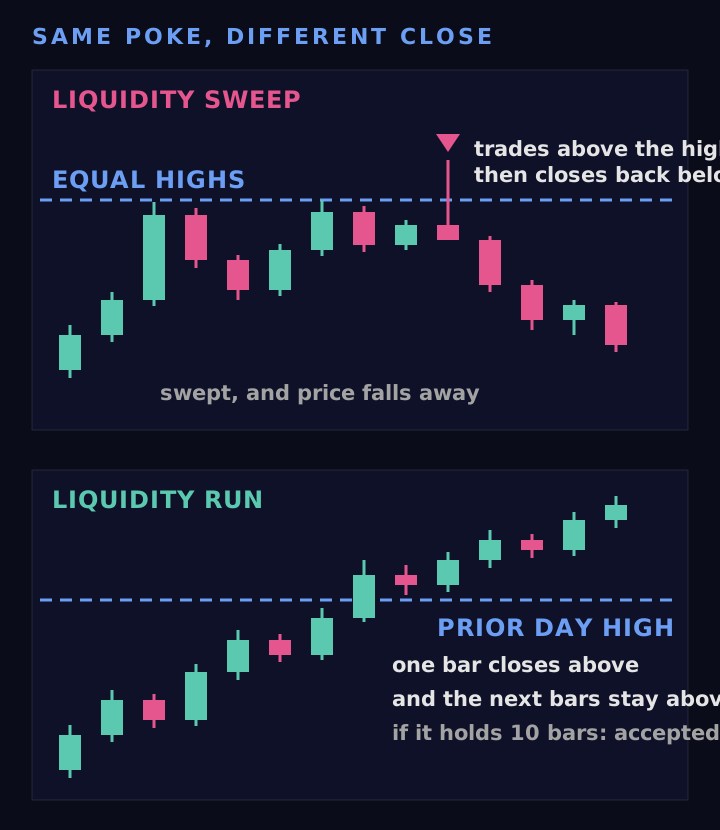
The same poke through a level. The sweep closes back inside. The run closes beyond and stays there. Schematic, not a real chart.
Why the close and not the wick
A wick shows where price went. The close shows where it settled when the bar ended. A bar that trades 5 ticks above a high and closes 4 ticks below it has turned the move down. A bar that trades 5 ticks above and closes 3 ticks above has not.
That's also why you can't call a sweep while the bar is still open. A 5 minute bar can sit above the level at minute 3 and be back below it at minute 5. Until it closes, it's a poke.
How far back is far enough?
A close one tick back inside is a weak answer, so a rule needs a minimum. In SweepScope that minimum is the setting Sweep Close Back, More Than (Ticks). The default is 2, so the close has to come back at least 3 ticks. On ES, with its 0.25 point tick, that's three quarters of a point.
If the bar doesn't close back that far, the level counts as broken, not swept, and SweepScope stops watching it for a sweep. Everything is decided on closed bars, so the mark appears when the bar is done.
There's no correct number here. A bigger close back means fewer marks and clearer rejections. A smaller one marks more bars, including some that barely made it back. The setting is a choice you make for your market and your bar size.
When the answer takes more than one bar
Sometimes price closes beyond a level and comes back a few bars later. For the key levels it draws, SweepScope gives each outcome its own name. The key levels are the prior day high and low (the regular session, 09:30 to 16:00 Eastern), the overnight high and low (18:00 to 09:30) and the opening range (the first 30 minutes by default).
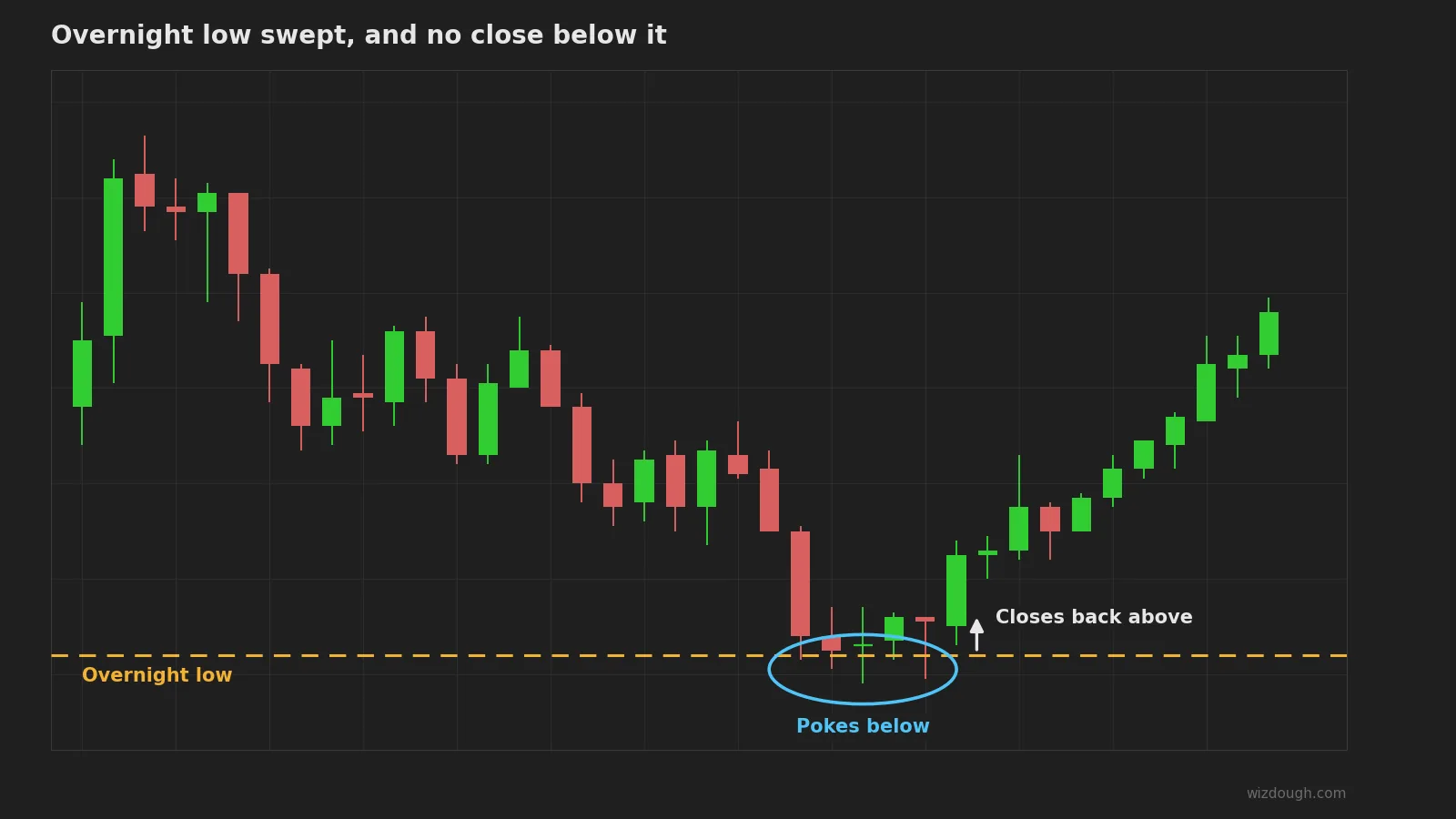
- Swept: a bar trades through the level and closes back inside by more than the close back setting.
- Broken: a bar closes beyond it.
- Reclaimed: after a break, a close back inside within Reclaim Bars bars (default 10). Our docs call this a slower sweep.
- Accepted: the level stays broken for Reclaim Bars.
Accepted is the run. Price closed beyond the level and stayed there for ten bars. On a 5 minute chart, that's 50 minutes of closes on the far side.
Read the sweep with the structure
A sweep is easier to read when you know what the swings were doing before it. The market structure rule comes from Dow Theory: an uptrend makes higher highs and higher lows, and a downtrend makes lower highs and lower lows.
StructureScope, the second indicator that comes with SweepScope, has a MarketStructure mode since version 1.01.0. It's up while the last two swing highs and the last two swing lows both rise, and down while both fall. The up state ends when price trades through the last swing low, and the down state ends when price trades through the last swing high. Set Color Background By to MarketStructure and the chart shades light green while the state is up and light coral while it's down.
Put the two side by side and a few cases separate:
- A sweep of an equal high inside an up structure. Price takes the highs and closes back below, but no swing low was traded through, so the up state holds. SweepScope marks a red triangle while the background stays green, so for that bar the two tools point different ways.
- A sweep that also takes the last swing low. Here the structure rule works on trades, not closes. A bar that trades through the last swing low ends the up state, even if it closes back above and SweepScope marks a sweep of those lows. Here too the two tools disagree, and that disagreement is worth a second look.
- A close through the last swing low that's accepted. That's a run. The lows were taken and price stayed below them. The up state is over.
None of these is a trade signal by itself.
What we saw when an AI model looked for sweeps
We ran a small test. We gave a current AI model bare ES charts from 5 trading days it had not seen. Then we asked it to mark the same setups our indicators mark.
From the chart picture alone, it found 1 of the 11 liquidity sweeps that SweepScope marked on those days. Given the raw price numbers instead, it did much better. It matched 8 of the 11, and it marked 5 more that our rule does not count as sweeps. On second entries, it agreed with WiSE on about 6 in 10 marks, from the picture or from the numbers.
This is a small test: 5 days, one market, one model, 11 sweeps. Models change fast, and we will run it again. It measured chart reading. It did not measure trading.
That's why WiSE 2.11 exports its signals. Your agent reads the setup as data, not as a picture, and you still make the decision.
Where SweepScope fits
SweepScope is a liquidity sweep indicator for NinjaTrader 8. It draws equal highs (EQH) and equal lows (EQL) where swings line up, plus the key levels above, and it marks each sweep with a triangle: red at the high of a bar that swept a high level, green at the low of a bar that swept a low level. A level that's still developing can't be swept yet. The full rules are in How to Use SweepScope.
What it doesn't do is tell you whether to take the trade. It doesn't know the news, it doesn't know where you'd put your stop, and it marks a sweep against the trend the same way it marks one with it. The close back setting decides what counts as a sweep. What you do with one is up to you.
Frequently asked questions
What is a liquidity sweep?
A move through a level where stops are likely to rest, such as equal highs or the prior day low, that then closes back on the other side. The stops get filled, and the move does not continue.
What is the difference between a liquidity sweep and a liquidity run?
Both trade through the level. A sweep closes back inside. A run closes beyond the level and keeps closing there. You can only tell them apart once the bar closes, and sometimes only after several more bars.
Is a liquidity sweep a reversal signal?
Not by itself. A sweep says the bar rejected the level at the close. Whether price turns depends on the market around it, which is why it helps to read the sweep with the swing structure.
Does a liquidity sweep indicator mark the sweep before the bar closes?
SweepScope doesn't. It decides everything on closed bars, so a sweep is marked when the bar that closed back inside is done.
Trading futures involves substantial risk of loss. Indicators are tools for reading the chart and do not promise any trading result.
Get the trading tool updates.
New releases, setup guides, and the occasional NinjaTrader tip. Roughly once a month.
